
Leave module
Leave requests that stop living in a WhatsApp group
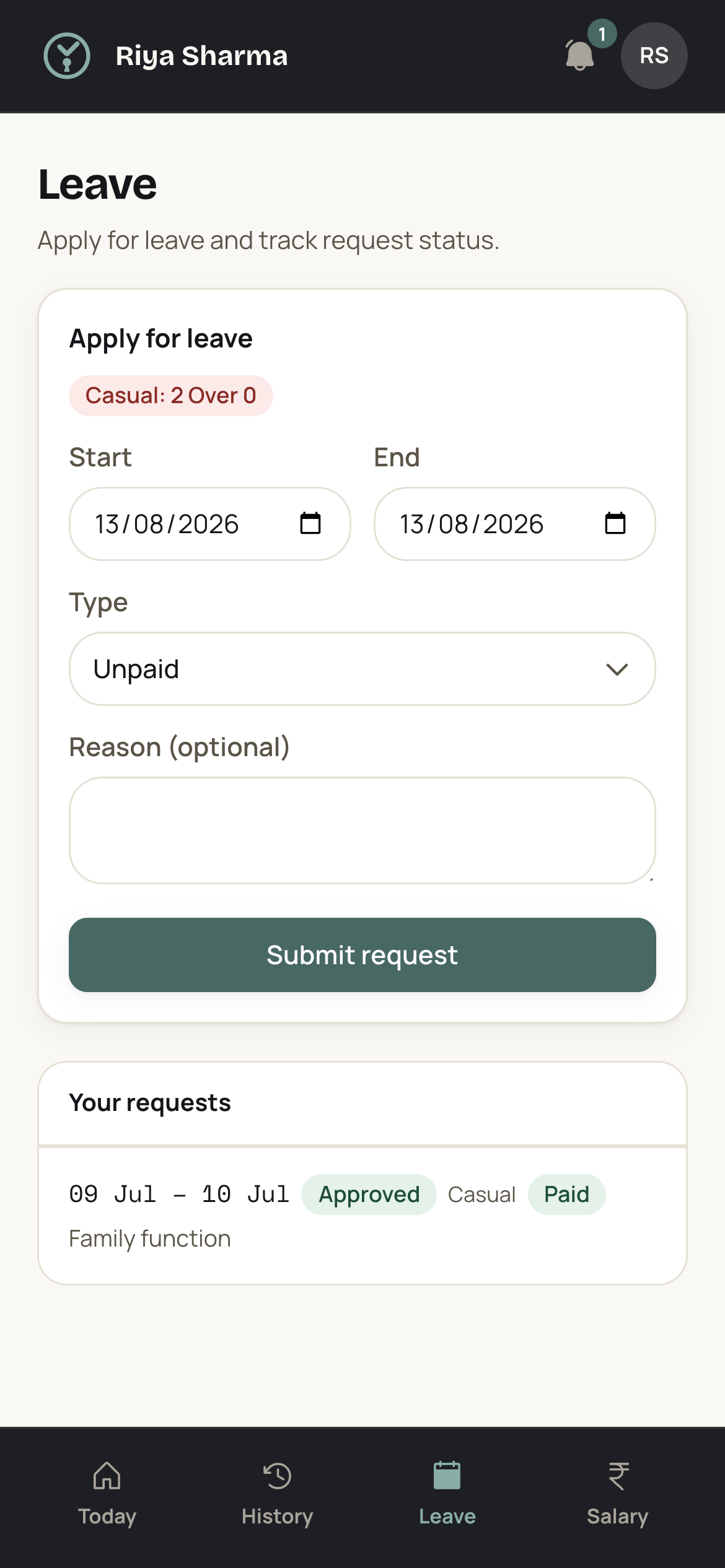
Staff apply for leave in the app with dates, a leave type and an attachment where one is needed. An admin approves it, rejects it, or marks it loss of pay. Salary for that month reads the decision straight off the record.
Last reviewed: September 2026
What it does
A leave request starts on the staff member's phone. They pick the dates, choose the leave type, and attach the certificate or the letter where your office asks for one. The request lands in the admin inbox, which web push keeps live, so one made at nine at night is waiting when the console is opened in the morning.
An admin does one of three things with it: approve, reject, or mark the days as loss of pay. That decision is the record. Monthly salary builds from attendance fractions, holidays, weekly offs and approved leave, so an approved day is paid and a loss-of-pay day is not. VTClock does not route a request through a manager and then a second approver before it reaches you. The request goes from the person who asked to the person who decides, and that is the whole path.
How it works
01 Set the weekly offs and this year's holidays
The holiday list and the weekly offs are configured once for the year. A day that is already a weekly off or a declared holiday is not a leave day, so nobody spends a casual leave on a Sunday or on a national festival holiday.
02 Get everyone signed in to the app
Each employee gets a record with an assigned office, a shift and a salary or day rate, and signs in to the app with a login code. The app runs on a phone and on a desktop, so a supervisor without a smartphone can still apply from the counter machine.
03 Staff apply with dates, a type and an attachment
The request carries the dates, the leave type and any file the staff member attaches, such as a doctor's note for two days off. It goes into the admin inbox and stays there until it is decided, so nothing is lost under later messages.
04 Approve, reject or mark loss of pay
An admin makes the call. Approve, and the day is paid leave. Reject, and the request is closed with that decision on it. Mark it loss of pay, and the day comes out of the month's payable days without a separate note to remember.
05 Close the month on decisions already made
At month end the salary figure builds from days worked, weekly offs, holidays and approved leave. There is no round of asking supervisors who was off in the third week, because every approval and every loss-of-pay mark is already sitting on the record.
Edge cases it handles
Leave applied for after the days have gone
Someone falls ill on a Tuesday and applies on the Thursday, after two days have already been marked absent. The request still carries its own dates, so an admin approves it for those dates and corrects the attendance record for the two days. The month reads the corrected version.
A worker who disappears without applying at all
A helper stops answering the phone and no request ever arrives. Nothing appears in the admin inbox, so the days sit on the attendance record as days with no check-in. An admin marks them loss of pay, or corrects the record once the reason is known, and salary follows that.
A week off that crosses the month boundary
A week off running from the twenty-eighth of one month to the third of the next is one request with one set of dates. The days fall into the month they belong to, so the first month's salary carries three of them and the next month's carries three. No day gets counted twice, and no day is dropped.
Two people ask for the same days
Both requests sit in the admin inbox with their dates on them, so the clash is visible before either one is decided. VTClock does not block the second request or warn you about the overlap. An admin reads the two sets of dates, approves one, and rejects or shortens the other by asking the person to reapply.
Who uses it
Schools and coaching centres
A teacher off on a Wednesday means a substitute for four periods, arranged before first bell. Requests that arrive with dates on them let the head decide the cover a day ahead instead of at eight in the morning.
Restaurants
Kitchen and floor staff ask for days off around weddings and festivals, often in the same week. Seeing the requests in one inbox with their dates shows the clash before two people are both granted the same Saturday night.
Manufacturing units
A line runs to a plan, and one absent operator on a shift changes the plan. Leave approved before the week starts gives the supervisor a fixed head count instead of a guess written on the board.
CA and law offices
Filing weeks are immovable, and a junior away for three days in one of them is felt. Requests carrying their own dates let a partner say yes in a quiet week and no in a busy one, with the decision recorded either way.
A worked example
For example, a receptionist earns INR 14,300 a month and the business counts February as 28 payable days. That gives INR 14,300 / 28 = INR 510.71 a day, rounded to two decimals. She applies for three days in the second week. One is approved as casual leave and paid, and the other two are marked loss of pay. Payable days come to 26, so 26 x INR 510.71 = INR 13,278.46. The two unpaid days account for 2 x INR 510.71 = INR 1,021.42 of the drop.
Setup checklist
- Set the weekly offs and this year's holiday list before anything else
- Add every employee with their assigned office, shift and monthly salary or day rate
- Issue login codes so staff can apply from their own phones
- Tell the team to stop sending leave requests in the group chat
- Open the admin inbox each morning and clear the pending requests
- Run one month of approvals alongside your register before you retire it
Frequently asked questions
Do staff need a separate app to apply for leave?
No. There is one app, and it runs on a phone and on a desktop. Staff sign in with a login code and apply from the same place they check in and out from. Admins sign in to the full console and decide the requests there. Nothing has to be installed for leave on its own, and nobody needs a second password to remember.
Can a staff member attach a medical certificate to the request?
Yes. A leave request carries dates, a leave type and attachments, so a staff member can send the doctor's note or the wedding card along with the application. The file stays attached to that request on the admin desk, which means the person deciding it can look at the note in the same place rather than hunting for a forwarded image in a chat.
Who approves leave when I am out of town for a week?
There are two kinds of access: staff and admin. Any admin can approve, reject or mark a request loss of pay, so make a second person an admin and requests keep moving while you are away. There is no manager role and no two-step approval chain, so a request never waits for one person to pass it along to another.
What happens to a leave day that falls on a weekly off or a holiday?
The weekly offs and the holiday list are set for your business, and a day that is already an off or a declared holiday is not a working day to begin with. Someone taking a Friday and a Monday around a Sunday off is asking for two leave days, and the Sunday between them stays what it always was. Salary reads that same list when it builds the month.
Do I still need my leave register once this is switched on?
Keep it for as long as it takes you to trust the app, then stop writing in it. Every request, its dates, its type and the decision on it sit in one place, and the month's salary builds from those approvals rather than from a page you have to add up. VTClock does not claim that this record satisfies any register the law asks you to maintain, so confirm that separately with your consultant.
Other modules
- AttendanceGeofenced check-in and check-out near assigned offices, with shift grace, late marks and overnight shifts handled for you.
- SalaryMonthly pay builds from attendance fractions, holidays, weekly offs and approved leave, so there are no side calculations.
- Salary slipsBranded, printable slips with earnings, an attendance summary and advance recovery. Staff see the same figures you print.
- Daily wagesPay wage-based staff per day worked, straight from the attendance record. Built for crews and site work.
Who runs this module
- Schools and coaching centresBetween the last exam paper and the first day of the new session, teaching staff draw a full salary while the register sits blank.
- Restaurants12 to 20 people, two services a day, and a register that gives the whole thing one line.
- Manufacturing unitsYour shift in-charge is the only person who knows who stayed back on Tuesday, and by the third of next month nobody can check him.
- CA and law officesThe first objection in a professional office is that everyone here is qualified, salaried and trusted, so why record attendance at all.
- Retail shopsThere is one of you and there are two shops.
- ClinicsBetween the morning list closing at one and the evening list opening at five, the clinic is shut and almost everybody on the premises is still drawing a monthly salary.
Terms worth knowing
- Loss of payLoss of pay, usually written LOP, is a day an employee is absent with no leave balance or approval to cover it, so the employer pays nothing for that day.
- Casual leaveCasual leave, usually written CL, is paid time off an employer grants for short personal reasons that arrive at little notice: a bank errand, a family matter, a day of travel.
- Sick leaveSick leave is paid time off an employee draws when they are unwell, under treatment, or advised rest by a doctor.
- Earned leaveEarned leave is paid leave an employee builds up by working, credited in proportion to days actually worked rather than granted upfront at the start of the year.
- Weekly offA weekly off is the rest day in each week on which an employee is not required to work.
- National and festival holidaysNational and festival holidays are the days a business declares closed with pay for the year.
See VTClock on your own team
Ask us for a WhatsApp demo and watch one leave request move from a phone to the month's salary figure.