
Attendance module
Attendance that matches where your team actually is
VTClock records attendance as a check-in on the phone that works only near the assigned office. Shifts, grace windows and overnight hours are set once. The record you read at month end is the one salary is built from.
Last reviewed: September 2026
What it does
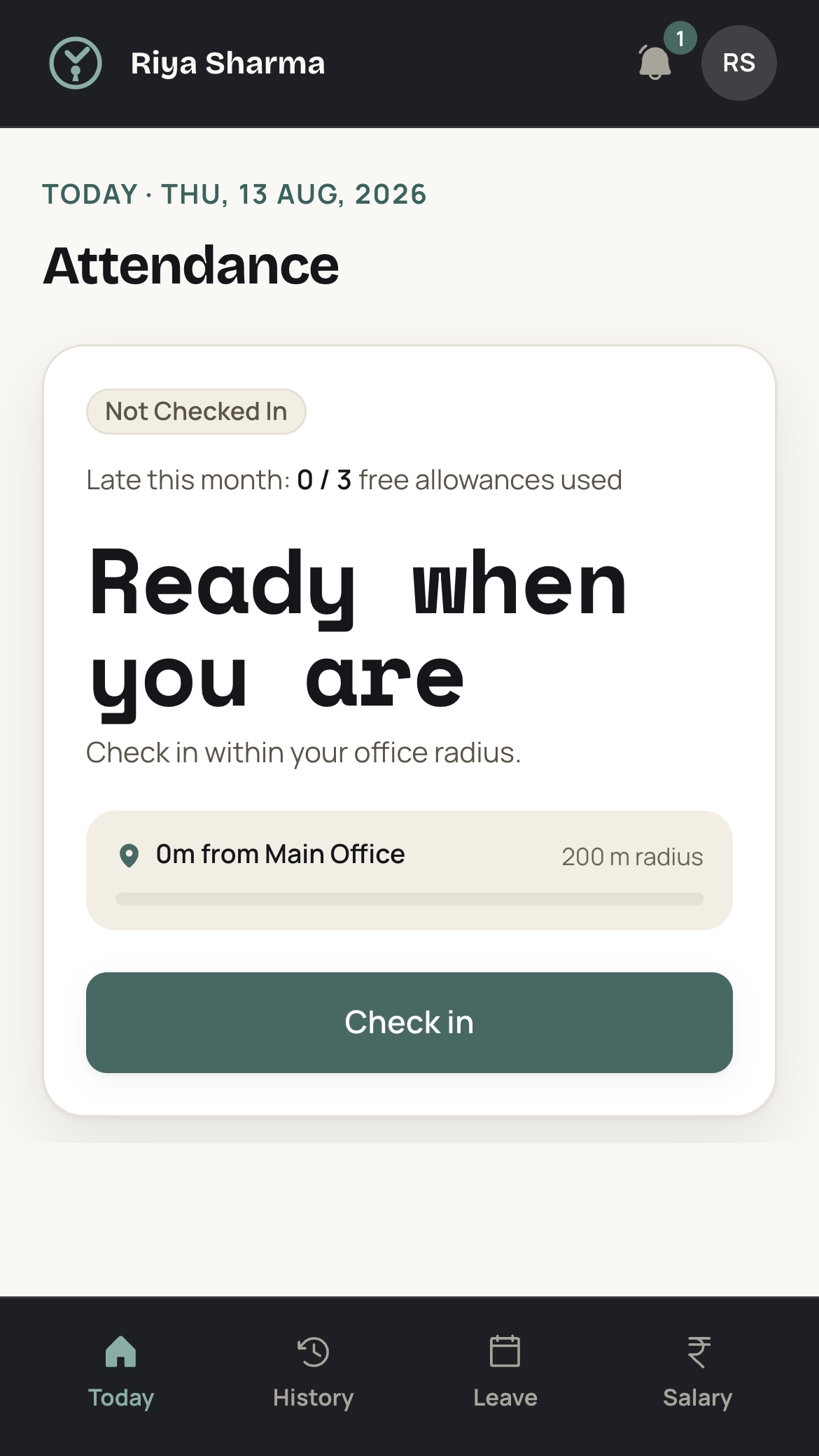
Attendance is recorded from the phone the staff member already carries. Check-in and check-out work near the office that person is assigned, and the radius is set for your business. A punch from home or from the road is blocked before it reaches the record. Each shift carries a start time, a grace window and a late allowance, so a bus running ten minutes behind does not become an argument at the counter. A shift crossing midnight is handled as one overnight shift.
Every check-in lands on the admin desk with a location pin, including late marks and waived marks. Where the record is wrong, an admin corrects it. That corrected record is what salary reads, so monthly pay and daily wages both come out of days actually worked.
How it works
01 Draw a geofence around each office
Add every shop, site or clinic as an office and set the radius around it. Two hundred metres suits a standalone building. A single-room shop on a crowded high street usually wants a tighter circle than that.
02 Set shifts, grace and the workweek
Each shift carries a start time, a grace window and a late allowance. Set the weekly offs and the holiday list for the year at the same time. Staff on different timings sit on different shifts.
03 Assign people to offices and issue login codes
Create each employee, assign the office and the shift they work, and set the monthly salary or the day rate. Staff sign in to the app with a login code, on a phone or on a desktop.
04 Staff check in and out near the office
The app confirms the phone is inside the geofence, then records the punch. A punch from outside is blocked, so nobody marks a day from the bus or from home. Check-out closes the shift the same way.
05 Watch the day on the admin desk
Every check-in appears with a location pin, late marks included. Web push keeps the admin inbox live, so you know by ten in the morning who has opened the shutter and who has not arrived.
06 Correct the record, then close the month
An admin fixes a missed check-out, a blocked punch, or a late mark that deserves a waiver. Salary, daily wages and the printed slip all read that same corrected record, so there is no side calculation.
Edge cases it handles
A shift that runs past midnight
A guard on an eight in the evening to four in the morning duty checks out on the next calendar date. Overnight shifts are handled as one shift, so the check-out after midnight closes the duty that started the evening before.
Grace runs out and the check-in becomes a late mark
Every shift has a grace window. A check-in inside it counts as on time. Past it, the record carries a late mark, which shows on the admin desk with its location pin. Where the reason is good, an admin waives the mark.
A late arrival the business treats as a half day
A late mark does not become a half day on its own. Where your rule is that arriving after a certain hour costs half a day, an admin marks the day as a half day. Salary then reads that attendance fraction.
One person covers two branches
Assign the person to the branch they work from on most days, with its own geofence. On a day spent at the other branch, the punch there is blocked, so an admin marks that day on the record. Where someone moves between branches every week, keep the assignment with the branch that holds their salary and correct the odd day.
A phone with location switched off
Check-in needs location, so with it switched off the app cannot place the person inside the geofence and the punch does not go through. The staff member turns location on and checks in again. Where the phone itself is the problem, an admin marks the day.
Who uses it
Retail shops
A counter opens at a fixed hour and cannot run short at that hour. Geofenced check-in tells the owner who opened the shutter at each outlet, without a round of phone calls every morning.
Security agencies
Guards are posted at client premises on rotating day and night duties. A punch that works only at the posting confirms the guard reached the site, and an overnight duty stays on one shift.
Contractors
Crews move between sites through the season and are paid by the day. Each site becomes an office with its own geofence, and the days that build the wage come from those check-ins.
Clinics
A clinic runs a morning session and an evening session with a long gap between them. Separate shifts with their own grace windows stop evening staff being read against a morning start time.
A worked example
Say a store supervisor is on INR 21,000 a month and September is counted as 30 payable days. The day rate is INR 21,000 / 30 = INR 700. He checks in on 28 days, takes one approved leave that is paid, and has one day marked loss of pay. Payable days come to 29, so 29 x INR 700 = INR 20,300. A daily wage helper at the same shop, on INR 620 a day, checked in on 24 days, so 24 x INR 620 = INR 14,880.
Setup checklist
- Add each office and set the geofence radius that fits the building
- Set the workweek, the weekly offs and the holiday list for the year
- Create each shift with its start time, grace window and late allowance
- Add employees, assign an office and a shift, and issue login codes
- Enter monthly salaries for salaried staff and day rates for wage-based staff
- Run one week alongside your register, compare the two, then drop the register
Attendance by city
- Ahmedabad, GujaratCrews hired at first light off the Naroda kadia naka settle their week by the day.
- Bengaluru, KarnatakaLunch service ends at four, dinner starts at six, and the part-timer covering both is on the road in between.
- Coimbatore, Tamil NaduAt eleven at night a spinning mill changes over its entire floor with no supervisor at the gate, while a pump shed at SIDCO Industrial Estate, Kurichi is still running overtime.
- Delhi NCR, DelhiPayday in a garment export unit in Okhla Industrial Area, Phase I and II opens with a dispute over days.
- Hyderabad, TelanganaThe second shift at a Jeedimetla packaging unit starts as the housekeeping crew on an IT campus finishes its own.
- Jaipur, RajasthanOctober brings the tourist season, and a heritage hotel in C-Scheme doubles its housekeeping roster inside a fortnight while a Sanganer print unit takes on daily-wage hands for a...
- Ludhiana, PunjabStitching on Gill Road is contracted per garment and the contractor pays the hands, so the unit that ships the goods holds no attendance record of its own.
- Mumbai, MaharashtraA track disruption on the suburban line puts eleven people at the counter together.
- Pune, MaharashtraThe 11pm to 7am changeover at a Bhosari MIDC job shop empties one bus and fills another.
- Surat, GujaratA Ring Road market shop, a dyeing floor in Pandesara GIDC and a polishing unit in Katargam each count a working day differently.
Frequently asked questions
Can staff mark attendance from home or from another branch?
No. Check-in works only when the phone is inside the geofence around the office that person is assigned. A punch from home, from the road, or from an outlet they are not assigned is blocked before it is recorded. Where someone genuinely worked elsewhere for a day, an admin marks that day on the record.
How does the attendance record turn into the salary figure?
Monthly pay builds from the attendance record, the weekly offs, the holidays you set, and the leave an admin approved. Wage-based staff are paid per day worked, straight from the same check-ins. There is no second sheet to reconcile, and the printed salary slip carries the attendance summary beside the earnings.
Do I need a biometric machine at each office?
No. VTClock uses a check-in from the staff member's own phone, and the geofence around the office is what confirms they are there. There is no fingerprint reader, face scanner or card punch to buy, install or maintain at any office, and nothing to move or replace when an outlet shifts to a new address.
What if someone forgets to check out at the end of a shift?
The day sits on the admin desk with no check-out time against it, so you can see it. An admin corrects the entry with the right check-out, the same way any other attendance mistake is fixed. Fixing it the day it happens leaves nothing piled up when the month closes.
Can the geofence radius be smaller for a small shop?
Yes. The radius is set for your business when the offices are configured, so two hundred metres is only an example. Set it wide enough that a check-in works from the entrance and tight enough that it does not stretch across the road to the tea stall.
Other modules
- LeaveStaff apply with dates, type and attachments. Approve, reject or mark loss of pay without chasing WhatsApp threads.
- SalaryMonthly pay builds from attendance fractions, holidays, weekly offs and approved leave, so there are no side calculations.
- Daily wagesPay wage-based staff per day worked, straight from the attendance record. Built for crews and site work.
- Salary slipsBranded, printable slips with earnings, an attendance summary and advance recovery. Staff see the same figures you print.
Who runs this module
- Retail shopsThere is one of you and there are two shops.
- ContractorsFifteen men on the slab this week and nine of them were somewhere else last week.
- Security agenciesYou deploy guards at client gates you do not own, on day and night reliefs, and the muster sits in thirty registers.
- Restaurants12 to 20 people, two services a day, and a register that gives the whole thing one line.
- Manufacturing unitsYour shift in-charge is the only person who knows who stayed back on Tuesday, and by the third of next month nobody can check him.
- ClinicsBetween the morning list closing at one and the evening list opening at five, the clinic is shut and almost everybody on the premises is still drawing a monthly salary.
Terms worth knowing
- GeofencingGeofencing is drawing a circle of a chosen radius around a work location and accepting an attendance punch only when the employee's phone reports a position inside that circle.
- GPS attendanceGPS attendance is marking a working day from a phone, where the app reads the device's satellite position at the instant of the punch and stores it alongside the check-in time.
- Shift grace periodA shift grace period is a fixed window after the shift start time in which a check-in is still treated as on time.
- Late markA late mark is the entry an employer records when an employee checks in after the shift start time and after whatever grace minutes the policy allows.
- Overnight shiftAn overnight shift is a shift that begins on one calendar date and ends on the next, such as 9:00 pm to 6:00 am.
- Half dayA half day is a working day on which an employee is present for only part of the shift and is counted for half the day's pay.
See VTClock on your own team
Message us on WhatsApp and we will walk you through geofenced check-in with your own offices and shifts on screen.