
Salary slips module
The salary slip your staff can check against their own days
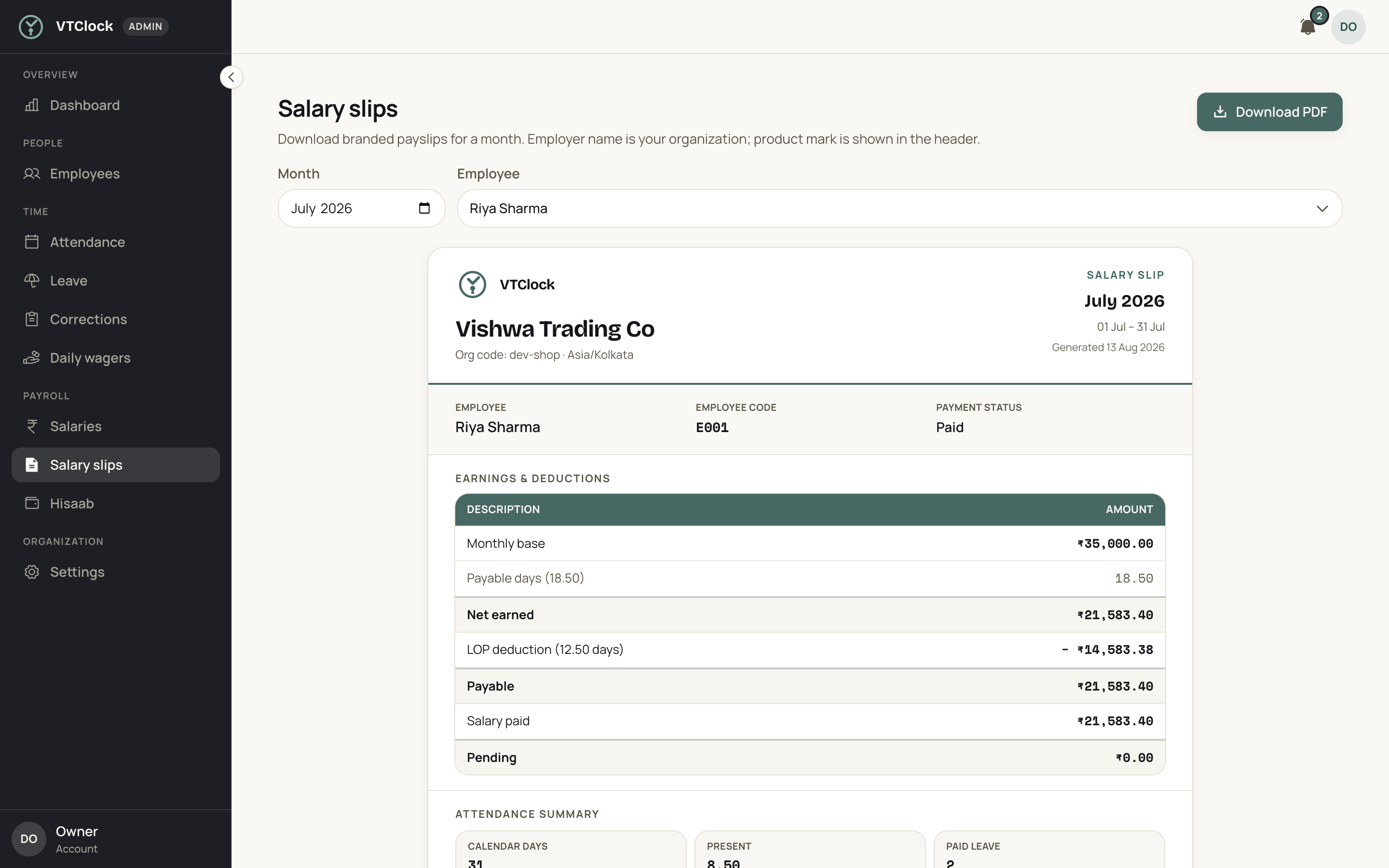
Most payday questions come down to which days were counted. A VTClock slip prints your business name, the earnings, a summary of the days behind them and anything coming off for an advance, on one page a staff member can check.
Last reviewed: September 2026
What it does
The slip is produced from the same employee record the rest of the app reads, so no figure is typed twice to make it. Your business name heads the sheet. Under it sits what the person earned for the month, a summary of the days that produced that figure, and the instalment on any advance they are repaying. The copy each person opens with their login code carries the same figures as the paper you print, which is what stops a slip being disputed on WhatsApp two evenings later.
The statutory deductions are not on this sheet. VTClock does not compute or deduct provident fund, state insurance, professional tax or tax on salary, and it produces no Form 16. It makes no claim that this sheet satisfies a register your establishment is required to keep. Ask your consultant which documents you owe your staff and by which date.
How it works
01 Put your business name on the sheet
Enter the business name that heads every slip you print, so the page a person carries home looks like it came out of your own office. That starts to matter the first time somebody hands one to a landlord who has never heard of your firm.
02 Correct the record before you print anything
The slip reads the month exactly as the record has it, so a missed check-out or a day marked wrongly prints just as wrongly. An admin fixes those on the record itself, and the last few days of the month are when that work belongs.
03 Answer the leave that is still sitting open
An application nobody decided and a day nobody marked as loss of pay both change what the earnings line says. Settle them before you print, because the slip everybody remembers is the one that had to be handed out twice.
04 Print for the file, and let staff open their own
One copy goes into the folder you keep for the year, and anybody who wants paper gets paper. The person also sees the same figures in the app, which answers most questions before anyone walks up to the desk to ask.
05 Reissue when a figure proves wrong
A correction made on the record produces a fresh sheet carrying the new figures. Hand that over and tear up the old one. Fixing the record instead of the paper is what keeps the month, the earnings and the printed page saying the same thing.
Edge cases it handles
Somebody who joined on the twelfth
A person who started mid-month has fewer days behind their earnings line, and the summary on the same page shows that shorter count. The smaller figure explains itself in print, so the first slip a new joiner is given does not turn into a conversation about whether they were underpaid.
A staff member says the day count is wrong
Put the summary on the sheet beside the record on the admin desk and walk the month together. Every date is a check-in, an approved leave, a weekly off, a declared holiday, or a day of loss of pay. Where the record is genuinely wrong, an admin corrects it and you print the month again.
A person who left in the middle of the month
Their attendance stops on the last day they came in, so the earnings line covers only those days and the sheet prints from the same record as everybody else's. Anything you settle beyond that month, including money they still owe the business, is decided outside the app and handed over separately.
A worker paid by the day wants one too
Wage-based staff earn the day rate multiplied by the days on the record, so their earnings line is that multiplication rather than a monthly figure divided down. Everything else on the page reads exactly as it does for salaried staff, including the instalment on an advance and the count of days behind the total.
Who uses it
Manufacturing units
Floor staff notice a total that has moved by a few hundred rupees and want to know why before the shift starts. A sheet carrying the day count beside the earnings answers that at the gate.
Schools and coaching centres
Teachers and office staff are asked for slips by banks, landlords and colleges, usually at short notice. A printed page with the institution name at the top is easier to give than a typed letter.
CA and law offices
An office where everybody reads documents for a living will read their own, line by line. Earnings, days and any advance instalment on a single page leaves the partner far less to explain.
Hotels
Staff rotate through morning, evening and overnight duties, and nobody holds a month of that in their head. The summary on the page does the remembering, which shortens the payday queue outside the manager's door.
A worked example
For example, take the November sheet for a store cashier on INR 18,720. Its summary reads 22 days present, 4 weekly offs, 2 days of approved leave and 2 days of loss of pay, which adds up to the 30 days of the month. Earnings are built on 28 of those days: INR 18,720 / 30 = INR 624 a day, and 28 x INR 624 = INR 17,472. One advance instalment of INR 1,040 is printed under that, leaving INR 17,472 - INR 1,040 = INR 16,432 at the foot of the page.
Setup checklist
- Enter the business name that heads every slip you print
- Put each person's monthly salary or day rate on their employee record
- Set the weekly offs and the year's holidays the summary reads against
- Enter any advance already running so its instalment appears on the sheet
- Print one slip at the close of a month and read it line by line
Frequently asked questions
Does the slip explain why a particular day went unpaid?
The sheet carries a summary of the month beside the earnings, so the days present, the leave that was approved and the days marked loss of pay all appear on the same page. Somebody who wants to know why the total moved can read that count instead of asking you to open a register at the desk.
Do staff get their own copy or do I print and hand it over?
Both work. Staff sign in to the app with their login code and see the same figures you print, so most questions are answered before anyone asks them. The sheet also prints for anybody who wants paper, whether that is for a personal file, a bank, or a landlord who will not look at a phone screen.
Are provident fund and income tax deductions shown on the slip?
No. VTClock does not compute, deduct or file provident fund, state insurance, professional tax or tax on salary, and it does not produce Form 16. The sheet shows what the person earned for the days worked and what came off for an advance. Where deductions apply to your establishment, your consultant handles them and can give you the current figures.
Will a bank accept one of these for a loan application?
VTClock prints a branded sheet showing earnings, the days behind them and any advance instalment. What a particular bank, landlord or college accepts is a rule they set, and VTClock makes no claim that the printout is a statutory document. Ask your consultant what your establishment is required to issue, and issue that.
Can pay be split into basic, house rent allowance and other heads?
The sheet carries the earnings for the month, the summary of days behind them, and any advance instalment. Where you have agreed one monthly figure with a person, that figure is what appears. If a bank or a landlord is asking you for pay broken into separate heads, message us on WhatsApp and we will tell you exactly what the printed page carries before you promise anything.
Other modules
- SalaryMonthly pay builds from attendance fractions, holidays, weekly offs and approved leave, so there are no side calculations.
- AttendanceGeofenced check-in and check-out near assigned offices, with shift grace, late marks and overnight shifts handled for you.
- Advance salaryGive an advance when staff need one. Recovery spreads over the following months and shows up on every slip.
- LeaveStaff apply with dates, type and attachments. Approve, reject or mark loss of pay without chasing WhatsApp threads.
Who runs this module
- Manufacturing unitsYour shift in-charge is the only person who knows who stayed back on Tuesday, and by the third of next month nobody can check him.
- Schools and coaching centresBetween the last exam paper and the first day of the new session, teaching staff draw a full salary while the register sits blank.
- CA and law officesThe first objection in a professional office is that everyone here is qualified, salaried and trusted, so why record attendance at all.
- HotelsWritten for a property owner paying 40 to 120 people across the front desk, the floors, the lawn and the boiler room.
- Retail shopsThere is one of you and there are two shops.
- ClinicsBetween the morning list closing at one and the evening list opening at five, the clinic is shut and almost everybody on the premises is still drawing a monthly salary.
Terms worth knowing
- Salary slipA salary slip is the statement an employer gives an employee for one wage period, setting out what was earned, what was deducted and what was paid.
- Gross salaryGross salary is the total of everything an employee earns for a month before a single deduction is taken off: the fixed structure of basic pay and allowances, plus whatever was...
- Net salaryNet salary is what is left of a month's earnings after every deduction the employer is required or authorised to make has come off.
- Loss of payLoss of pay, usually written LOP, is a day an employee is absent with no leave balance or approval to cover it, so the employer pays nothing for that day.
See VTClock on your own team
A WhatsApp message gets you a sample slip with your own business name on it and one month of real days.